
MCP connector at mcp.tipranks.com · Production
TipRanks financial data - built for AI agents
Plug Claude, ChatGPT, Cursor, or any MCP client into live analyst ratings, Smart Score, technicals, earnings, and your TipRanks portfolios. One URL, OAuth or API key, ready in 60 seconds.
Free tier · no credit card required.
Same TipRanks data that powers research at 100+ banks, brokers, and exchanges - including Robinhood, E*TRADE, Interactive Brokers, Santander, and TMX - plus tipranks.com (10M+ monthly users).
Building an agent? Skip the signup form.
Mint a free-tier API key in one HTTP call - no email verification, returns a usable key immediately:
curl -X POST https://mcp.tipranks.com/dev/api/signup \
  -H 'content-type: application/json' \
  -d '{"email":"agent@example.com","password":"<10+ chars, 3 of: lower/upper/digit/symbol>","accept_terms":true,"label":"my-agent"}'
→ returns { "api_key": "tr_live_...", "mcp_url": "https://mcp.tipranks.com/mcp/", "tier": "free", "rpm_limit": 10, "monthly_limit": 50 }
What you can do
Market data & ratings
- Analyst consensus + price targets
- Smart Score (1–10)
- Bull / bear AI summaries
- Hedge fund + insider signals
- Politician trade tracking
- News + sentiment
Technicals & instruments
- RSI / MACD / moving averages
- ETFs (forecast, exposures, screener)
- Commodities, forex, crypto, indices
- Earnings + dividend history
- Stock splits, buybacks, IPOs
- FDA / clinical-trial catalysts
Your portfolios OAuth
- Holdings + cost basis
- Performance vs. S&P 500
- Allocation breakdown
- Risk profile + Sharpe ratio
- Best trades + recent activity
See it in action
Real screenshots of Claude.ai using this connector. Each one is a single prompt - the chart, dashboard, or table is rendered inline by Claude's Analysis tool from JSON returned by TipRanks MCP tools.
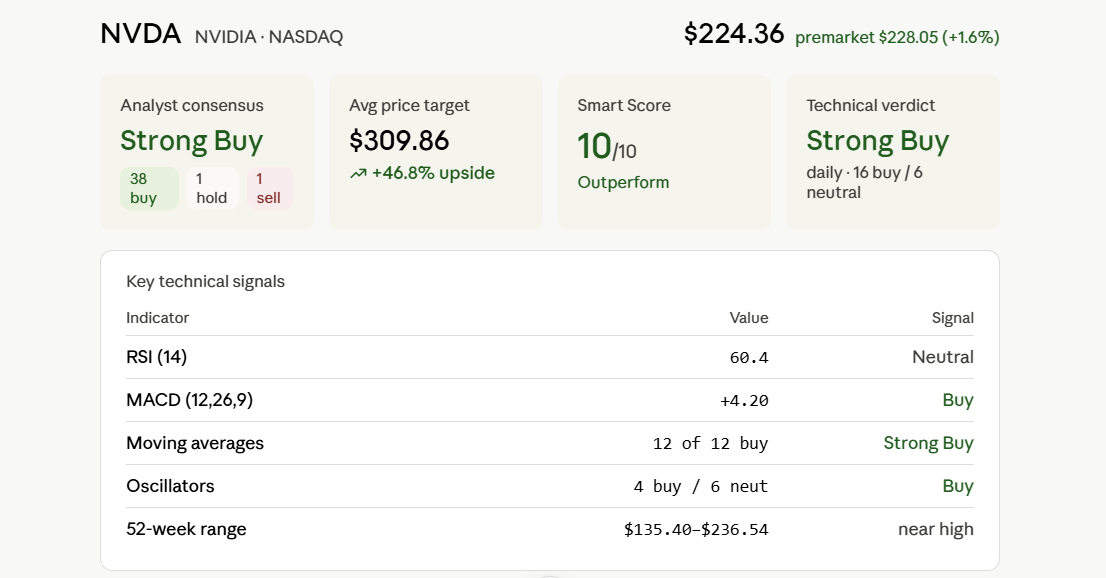
get_assets_data + get_technical_analysis; Claude lays out consensus, price target, Smart Score, and a key-signals table in one view.
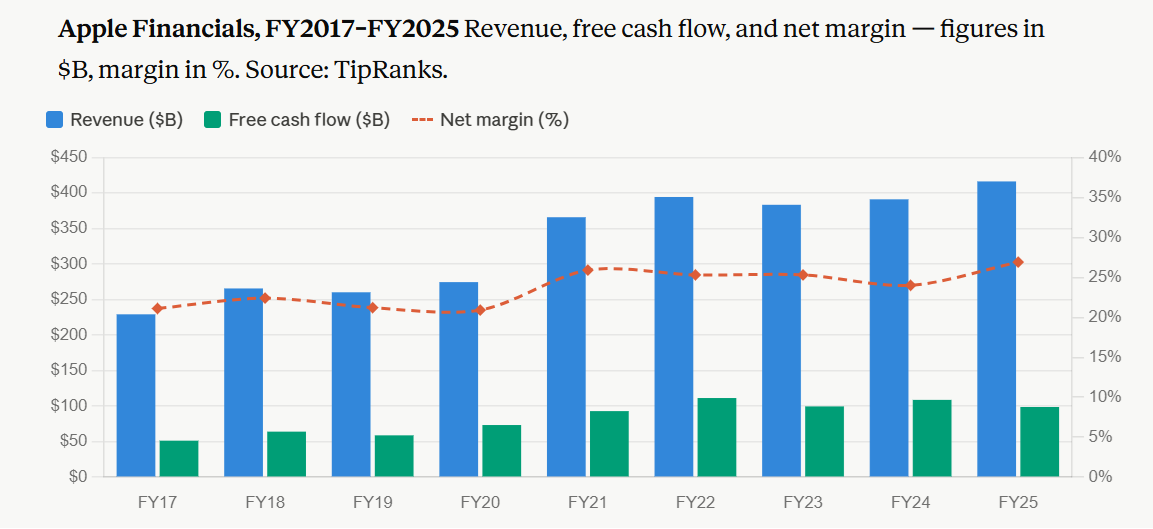
get_financials; Claude charts revenue + FCF as bars and net margin as a line on a secondary axis.
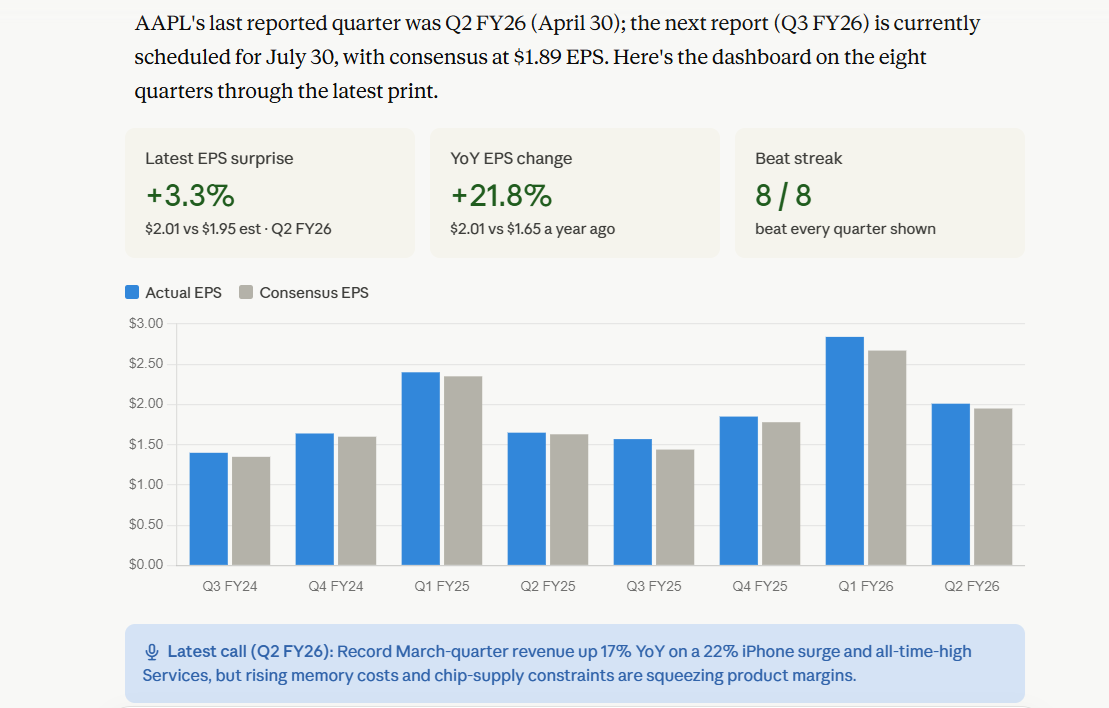
get_earnings_history + get_earnings_call_summary. Claude builds a dashboard with EPS surprise, beat streak, and an actual-vs-estimate EPS chart.
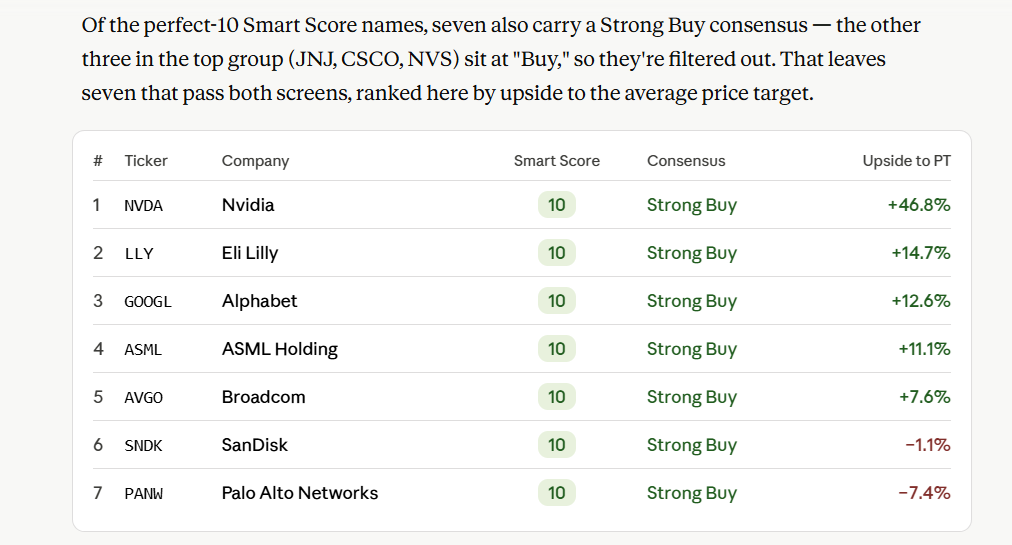
get_top_smart_score_stocks + get_assets_data; Claude filters to names passing both screens and ranks them by upside to price target.
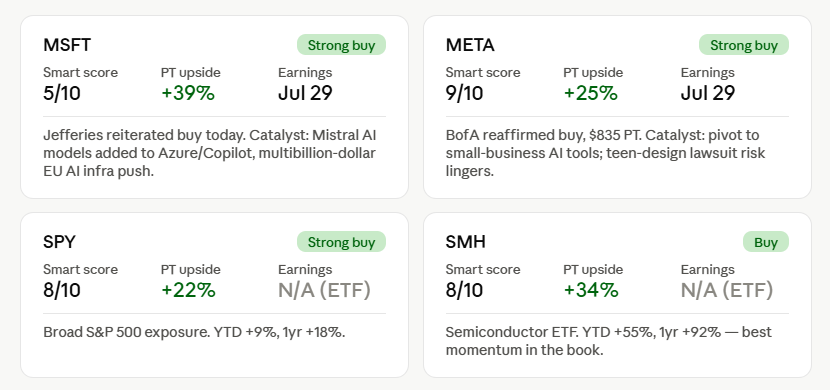
list_my_portfolios + get_portfolio_holdings with ratings and catalysts; Claude builds a per-holding dashboard - Smart Score, price-target upside, earnings date, consensus - over your own holdings via the tipranks:portfolio scope.
See the full playbook catalog ↓
Ready to plug it in? Connect any MCP client in about a minute.
Free tier · no credit card required.
Quickstart
Two ways to authenticate. Pick whichever fits the client.
Remote - OAuth (recommended for Claude.ai & Claude Desktop)
https://mcp.tipranks.com/mcp/Sign in with your TipRanks account when the client prompts. Grants tipranks:portfolio if you opt in.
Remote - API key (recommended for ChatGPT, Cursor, Codex, agents)
https://mcp.tipranks.com/mcp/?apikey=YOUR_API_KEYGet a free key at /dev/signup or via the JSON API (see Run locally).
Claude.ai (web & desktop)
The full OAuth flow - sign in with TipRanks, approve scopes, done. Claude.ai handles token refresh automatically.
- Open Claude.ai → Settings → Connectors (or the connector panel in Claude Desktop).
- Click Add custom connector.
- Enter the URL:
https://mcp.tipranks.com/mcp/ - Click Connect. A new tab opens to TipRanks for sign-in (skipped if you already have a TipRanks session).
- On the consent screen, approve
tipranks:read(market data) and optionallytipranks:portfolio(your TipRanks portfolios).
You'll need a TipRanks account. Free, Premium, and Ultimate plans all work; per-account monthly quotas differ - see Scopes & quotas.
Claude Desktop config file
If you prefer editing the config file directly (or you're on an older Claude Desktop build that only supports stdio), point at the hosted server through the mcp-remote proxy with your API key:
{
  "mcpServers": {
    "tipranks": {
      "command": "npx",
      "args": [
        "-y",
        "mcp-remote",
        "https://mcp.tipranks.com/mcp/?apikey=YOUR_API_KEY"
      ]
    }
  }
}
Replace YOUR_API_KEY with the key shown after signup. Save the file at:
- macOS:
~/Library/Application Support/Claude/claude_desktop_config.json - Windows:
%APPDATA%\Claude\claude_desktop_config.json
Restart Claude Desktop and the tipranks tools appear in the 🎲 menu.
Claude Code CLI
One command - works against the hosted server. Replace YOUR_API_KEY with a real key.
claude mcp add -t http tipranks https://mcp.tipranks.com/mcp/?apikey=YOUR_API_KEYOr, if you'd rather use OAuth (and don't mind the consent screen popping up in your browser):
claude mcp add -t http tipranks https://mcp.tipranks.com/mcp/List or remove later with claude mcp list / claude mcp remove tipranks.
ChatGPT
TipRanks is approved in the ChatGPT plugin directory, so the simplest path is to install it there — no developer-mode setup. You connect over OAuth: sign in with your TipRanks account and approve the requested scopes. (ChatGPT's connector framework uses OAuth 2.1 for authenticated apps; TipRanks supports it natively, with dynamic client registration and PKCE.)
- Open ChatGPT → Settings → Plugins (or the Plugins entry in the sidebar).
- Search for TipRanks in the plugin directory and open it.
- Click Install. When prompted to connect, you'll be sent to TipRanks to sign in and approve
tipranks:read(market data) and optionallytipranks:portfolio(your TipRanks portfolios). - Start a new chat, then call TipRanks by name or from the tools menu.
Advanced: add it manually (developer mode)
Only needed if TipRanks isn't in your plugin directory yet and you want to add the connector by hand. It still uses OAuth — ChatGPT authenticates connectors with your TipRanks sign-in, not an API key.
- Open ChatGPT → Settings → Apps & Connectors.
- Enable Developer mode under Advanced settings, then click Create.
- MCP Server URL:
https://mcp.tipranks.com/mcp/ - Authentication: OAuth — you'll be sent to TipRanks to sign in and approve access.
Cursor
Edit ~/.cursor/mcp.json (user-wide) or .cursor/mcp.json in your project root:
{
  "mcpServers": {
    "tipranks": {
      "url": "https://mcp.tipranks.com/mcp/?apikey=YOUR_API_KEY"
    }
  }
}
Reload Cursor and the tools appear under the MCP indicator.
VS Code
Add an HTTP MCP server in .vscode/mcp.json (workspace) or the user-level equivalent:
{
  "servers": {
    "tipranks": {
      "type": "http",
      "url": "https://mcp.tipranks.com/mcp/?apikey=YOUR_API_KEY"
    }
  }
}
OpenAI Codex
Codex CLI reads ~/.codex/config.toml. Use the mcp-remote proxy because Codex's MCP transport is stdio-only:
[mcp_servers.tipranks]
command = "npx"
args = ["-y", "mcp-remote", "https://mcp.tipranks.com/mcp/?apikey=YOUR_API_KEY"]
Gemini CLI
One-shot command:
gemini mcp add -t http tipranks https://mcp.tipranks.com/mcp/?apikey=YOUR_API_KEYOr edit ~/.gemini/settings.json directly:
{
  "mcpServers": {
    "tipranks": {
      "httpUrl": "https://mcp.tipranks.com/mcp/?apikey=YOUR_API_KEY"
    }
  }
}
Run locally / programmatic signup
Programmatic signup (one HTTP call, no email verification)
Agents and CI jobs can mint a free-tier key in one round-trip. Password must be at least 10 characters and include at least three of: lowercase, uppercase, digit, symbol. Pass "accept_terms": true to accept the MCP Terms of Service — it's required, exactly like ticking the box on the web signup form.
The free tier is rate-limited (10 rpm / 50 per month) so abuse is bounded without an email-verification gate. Email here is an account identifier. The web signup form does require email verification before you can sign in to manage keys via /dev/keys; the API endpoint trades that for one-call usability.
POST https://mcp.tipranks.com/dev/api/signup
Content-Type: application/json

{ "email": "you@example.com", "password": "Aa1!aaaaaaaa", "accept_terms": true, "label": "my-agent" }
Returns 201 with a usable key:
{
  "account_id": "dev_...",
  "api_key": "tr_live_...",
  "tier": "free",
  "rpm_limit": 10,
  "monthly_limit": 50,
  "manage_url": "https://mcp.tipranks.com/dev/login",
  "mcp_url": "https://mcp.tipranks.com/mcp"
}
Scopes & quotas
| Scope | What it grants |
|---|---|
tipranks:read |
All market data: ratings, technicals, news, screening, ETFs, commodities, forex, crypto. Default scope - covers every non-portfolio tool. |
tipranks:portfolio |
Read your TipRanks portfolios (holdings, performance, allocation). Limited to portfolios you owned at the moment of authorization. API keys never get this scope - portfolio access is OAuth-only. |
list_my_portfolios, get_portfolio_holdings, get_portfolio_overview, get_portfolio_analysis, get_portfolio_performance — require tipranks:portfolio, and an API key is only ever granted tipranks:read. They stay visible in tools/list for every caller, and the scope check runs inside the tool — after metering — so each attempt costs a call against your monthly quota and returns an error. Connect over OAuth for portfolio data, and if you point a model at an API key, tell it these five are unavailable so it doesn't retry them.OAuth users (connector)
Tool calls are counted per calendar month per TipRanks user. Quota resets on the 1st of every month (UTC).
| TipRanks plan | Tool calls / month |
|---|---|
| Free / Basic | 10 |
| Premium | 100 |
| Ultimate | 200 |
Have a paid MCP subscription? A Smart, Advanced, or Professional API-key plan on the same email as your TipRanks login also lifts this connector quota — to 1,000, 2,500, or 6,000 calls/month respectively — so you don't have to switch to an API key to spend your paid allowance.
Changed your TipRanks access after connecting? Your tier is captured when you authorize, so an updated plan applies once we re-read it: just open the developer dashboard while signed in to TipRanks, or reconnect the connector in your client. Either picks up the updated quota — no need to wait for the monthly reset.
API key users
Two windows, metered against different subjects. The monthly cap is one pool shared by every active key on your account — it meters per account, so minting extra keys gives you more keys, not more quota. The per-minute burst guard is the one that's per key: it keeps a runaway agent from hammering the API in a tight loop without throttling your other keys. get_my_usage and /dev/usage both report the shared monthly pool.
| Plan | Requests / minute (per key) | Requests / month (shared per account) |
|---|---|---|
| Free | 10 | 50 |
| Smart | 30 | 1,000 |
| Advanced | 60 | 2,500 |
| Professional | 120 | 6,000 |
TipRanks Premium or Ultimate subscriber? Your free keys are lifted to the monthly allowance your TipRanks plan already grants on the connector — 100 or 200 instead of 50. The developer portal is what applies it: open /dev/keys or /dev/usage, or create a key there, from a browser signed in to TipRanks under the same email address as your developer account. A key minted through the JSON signup API meters at 50 until you do, and it tracks your plan both ways — if the subscription lapses, the next portal visit puts it back to 50. Paid key tiers are unaffected.
Hitting an API-key cap returns HTTP 429 with X-RateLimit-Limit, X-RateLimit-Remaining, X-RateLimit-Window, and Retry-After headers so clients can back off intelligently. Manage your plan from the developer portal; updated limits cascade onto every active API key on your account.
OAuth connector callers get those headers plus X-RateLimit-Reset, but an HTTP 200, carrying the limit message as the tool's own result rather than a transport error. This is deliberate: assistants collapse a non-2xx tool call into a generic "tool failed" banner and discard the body, so a 429 told the user nothing and often sent them off to reconnect — which never helps, because the count follows the account, not the token.
What counts toward your quota
Every tool call is metered whether or not it returns data — a request for an unrecognised ticker, or one rejected for an invalid argument, costs the same as a successful call. This part is the same on both ladders.
Not metered: the connection handshake your client performs when it connects (initialize, tools/list and the other discovery calls), so installing the connector never spends your allowance before you've asked anything; get_my_usage itself, so you can always check where you stand — including once you're over the cap; and anything rejected before it reaches a tool, such as a request with a missing or invalid credential.
Where the two ladders differ: once you are over an API-key monthly cap, the rejected calls are not added to your total, so it settles at the cap. On the OAuth connector every attempt is counted, including ones refused for being over the limit — so if a client keeps retrying past the cap, get_my_usage can report a figure above your plan's limit. Neither affects when access resumes: both reset at the start of the next calendar month (UTC).
To check where you stand at any point, just ask - the get_my_usage tool reports calls used this month, your limit, how many remain, your plan tier, and when the quota resets (UTC). It's free: calling it never counts against the quota.
Example prompts
Once connected, ask the model questions like these. The tool calls happen automatically.
“What's the analyst consensus and Smart Score for NVDA right now, and what are the biggest bull and bear arguments?”
What happens: the model calls get_assets_data for ratings, price target, Smart Score, and sentiment, then get_bulls_bears_summary for the AI-generated bull/bear key points. Returns a side-by-side comparison with the upside-to-target and the sentiment trend.
“Find the 10 best-rated US healthcare stocks under $200 with high Smart Score, and tell me which one has the strongest hedge-fund buying.”
What happens: get_top_rated_stocks with sector=healthcare, then get_assets_data on the shortlist to filter by price and Smart Score, then a sort by the hedge-fund signal field. A multi-step research workflow in one prompt.
“Compare AAPL, MSFT, and GOOG on the daily chart - RSI, MACD, and moving averages - and flag which one is closest to overbought.”
What happens: a single get_technical_analysis call with tickers="AAPL,MSFT,GOOG" returns oscillators, moving averages, and pivot points. The model interprets the indicator scores (1=Sell, 2=Neutral, 3=Buy) and the RSI value vs. 70 to call out the most-overbought name.
“Show my TipRanks portfolio holdings and tell me which positions look weak based on recent analyst changes.” requires tipranks:portfolio
What happens: list_my_portfolios → get_portfolio_holdings → get_assets_data on the tickers in the portfolio. The model cross-references your positions against current analyst consensus, Smart Score, and price targets. Only works via the OAuth connector, not API keys.
Playbooks
The examples above are single questions. The connector really shines on multi-step research workflows - Claude calls one tool, looks at the result, calls another, then synthesizes. These are copy-pasteable starting points; tweak tickers / sectors / time windows to match what you're after.
Pre-market briefing
“Show me today's biggest pre-market gainers in US tech, then for the top 5 pull recent analyst upgrades and any earnings scheduled this week.”
Chains: get_market_movers → get_assets_data (to filter sector and surface analyst consensus + price target) → get_assets_news → get_assets_events. One question, four tools, one coherent briefing for the open.
Earnings preview
“AAPL earnings is tomorrow - show me actual-vs-estimate EPS for the last 8 quarters, what management said on the last call, and the bull/bear case for the upcoming report.”
Chains: get_earnings_history → get_earnings_call_summary → get_bulls_bears_summary. With the Analysis tool enabled in Claude, the EPS history plots as a bar chart inline; the call summary surfaces management guidance and sentiment alongside it.
Portfolio health check requires tipranks:portfolio
“Look at my TipRanks portfolio and flag any positions with downgrades this week, risk warnings, or technically weak setups.”
Chains: list_my_portfolios → get_portfolio_holdings → get_assets_data → get_assets_warnings → get_technical_analysis on the holdings. A weekly check-in that surfaces concerns without you having to drill into every name.
Sector rotation pitch
“Which US sectors look cheapest right now by analyst upside? For the two cheapest, give me the 3 highest-rated stocks in each with their Smart Score and 12-month price target.”
Chains: get_sector_analysis → get_top_rated_stocks (filtered per sector) → get_assets_data on the shortlist. Surfaces undervalued sectors and concrete names to act on.
Financial deep-dive
“Show me AAPL's revenue, free cash flow, and net margin trend over the last 10 years. Is the company getting more or less profitable on its top line?”
Chains: get_financials with period="annual", count=10. The Analysis tool plots revenue + FCF as overlaid bars and net margin as a line on a secondary axis. One tool call, three time series, the classic financial-analyst chart.
Catalyst hunt - biotech
“What FDA decisions are coming in the next 2 weeks, and which of those biotech names have the strongest analyst coverage and Smart Score?”
Chains: get_clinical_trials → get_assets_data on the tickers behind each drug → get_assets_news for recent coverage. Filters the upcoming catalyst calendar to names worth a closer look.
Charts & visualizations
You don't need anything special on the connector side to get charts - that part comes from the client.
On Claude.ai and Claude Desktop, the built-in Analysis tool (a sandboxed JS/Python runtime) can take any time-series data an MCP tool returns and render it as a chart in the conversation. Just ask - e.g. “chart NVDA's daily close for the past year with 50- and 200-day moving averages” - and Claude will call the relevant tool (here get_assets_data or one of the historical tools), pipe the JSON through the Analysis tool, and produce a plot inline. The same works for technical indicators, multi-asset comparisons, and portfolio performance breakdowns.
Tools that produce chart-friendly output include the historical OHLCV endpoints (get_commodity_historical, get_forex_historical, get_crypto_historical, get_index_historical), the per-ticker financial statements time series (get_financials), the per-ticker earnings and dividend time series (get_earnings_history, get_dividend_history), the per-ticker buyback series (get_buybacks with a ticker argument), and the portfolio performance tools (get_portfolio_performance, get_portfolio_overview).
Build your own agent
The connector works in any MCP client, but you can also drive it straight from code. Point the Anthropic Messages API at mcp.tipranks.com as a remote MCP server, hand it your API key, and Claude calls the TipRanks tools on its own - no per-tool wiring on your side.
Here's the whole integration - give it a ticker, and Claude pulls analyst ratings, financials, technicals, and smart-money data to write a research memo:
import anthropic

client = anthropic.Anthropic()  # reads ANTHROPIC_API_KEY

resp = client.beta.messages.create(
    model="claude-opus-4-8",
    max_tokens=8000,
    betas=["mcp-client-2025-11-20"],
    system="You are an equity research analyst. Use the tools to gather "
           "analyst ratings, financials, technicals, and smart-money flows, "
           "then write a due-diligence memo. Informational only.",
    mcp_servers=[{
        "type": "url",
        "url": "https://mcp.tipranks.com/mcp/",
        "name": "tipranks",
        "authorization_token": "tr_live_...",   # your API key
    }],
    tools=[{"type": "mcp_toolset", "mcp_server_name": "tipranks"}],
    messages=[{"role": "user", "content": "Produce a due-diligence memo on NVDA."}],
)
print("".join(b.text for b in resp.content if b.type == "text"))
The full runnable example - it prints the TipRanks tools Claude calls, then the memo, and handles the pause_turn resume loop - is on GitHub: TipRanks/mcp → examples/due-diligence-agent.
More reference agents live in the same repo under examples/: an earnings-season companion (ticker → earnings brief) and a smart-money screener (a ranked shortlist of ideas hedge funds and insiders are buying). Fork one and make it yours.
Tools reference
Every tool is read-only, idempotent, and returns JSON. Categories follow the structure of server.py.
Asset data
| Tool | Description |
|---|---|
get_assets_data | 40 fields per ticker: consensus, price target, Smart Score, sentiment, fundamentals, 52w high/low, next earnings. |
get_stock_quotes | Real-time price, intraday OHLC, day change, volume, pre/after-hours data for one or more stocks/ETFs. |
get_stock_prices | Historical daily closing-price series (1m to all) for up to 5 stocks/ETFs, downsampled and chart-ready. |
get_stock_catalyst | AI-generated summary explaining today's price move per ticker, with sentiment label. |
get_assets_events | Upcoming dividend, earnings, and coupon dates for the supplied tickers. |
get_assets_news | Recent news articles per ticker with sentiment, source, URL, and date. |
get_latest_news | Latest TipRanks editorial/wire news with a text excerpt — general market feed or filtered by ticker, category, or date. |
get_article | Full text of a single TipRanks article by URL, slug, or post id. |
get_assets_warnings | Risk warnings (financial, governance, regulatory) attached to a ticker. |
get_ai_stock_analysis | AI Stock Analysis score (0-100) per ticker - six frontier models each with their own score, rating, price target and factor breakdown, plus the cross-model consensus. Distinct from the Smart Score. |
get_earnings_history | Chart-ready quarterly earnings - actual EPS vs. estimate, surprise %, YoY, revenue actual vs. estimate, plus next-quarter consensus. |
get_earnings_call_summary | Latest earnings call - management guidance, call sentiment, AI-extracted highlights and lowlights. |
get_financials | Chart-ready financial statements - income statement / balance sheet / cash flow / margins / ratios across annual, quarterly, or TTM periods. |
get_dividend_history | Chart-ready dividend payments per ticker - per-payment series + annual totals, current yield / payout ratio / frequency snapshot. |
get_bulls_bears_summary | Discrete bull and bear key points per ticker (the individual bullets, each with a topic). |
get_blogger_sentiment | Financial-blogger consensus per ticker (bullish/bearish split) plus the underlying blogger articles. |
get_company_kpis | Operational KPIs: segment revenue, geographic split, active users, gross margins. |
get_investor_sentiment | Crowd / retail investor sentiment for a stock. |
get_peers | Peer companies with comparative metrics. |
Discovery & screening
| Tool | Description |
|---|---|
get_trending_stocks | Stocks with recent analyst attention. Filter by analysts / bloggers / both, country, sector window. |
get_top_rated_stocks | Highest-rated stocks by top analysts; filter by sector and country. |
get_market_movers | Today's gainers, losers, most active, unusual volume. |
Alternative data & signals
Signals beyond price and ratings - what political / insider / hedge-fund money is doing, where the biotech catalysts are, who's buying back stock.
| Tool | Description |
|---|---|
get_politicians | List of US politicians tracked for trading activity (congress, senate). |
get_politician_activity | A specific politician's trades or holdings. |
get_insider_transactions | Corporate-insider (Form 4) transactions per ticker - dates, insider names and roles, action, shares, approx price, value, and the SEC filing link. |
get_hedge_fund_holdings | Hedge-fund share-count history per ticker (13F-based timeseries). |
get_hedge_fund_activity | Per-fund hedge-fund holdings and recent transactions per ticker (which funds, how much each changed, value, rank). |
get_top_hedge_fund_managers | Best-performing hedge fund managers by success rate and average return. |
get_best_performing_experts | Top analysts / insiders / hedge funds / bloggers / firms by TipRanks success rate. |
get_analysts_by_firm | Analysts at a given firm with rank, average return, and covered tickers (optional sector filter). |
get_recent_analyst_ratings | Recent analyst rating actions on a stock (trailing 12 months) with firm, rating, price target, and the analyst's TipRanks star rating and rank. |
get_clinical_trials | FDA / clinical-trial calendar - PDUFA dates, biotech catalysts and the tickers behind each drug. |
get_buybacks | Cross-market or per-ticker share-repurchase activity (chart-ready time series in per-ticker mode). |
Macro & calendars
| Tool | Description |
|---|---|
get_economic_calendar | Upcoming and recent economic events - Fed meetings, CPI, jobs, GDP. |
get_earnings_calendar | Upcoming earnings dates across all stocks for a date range, with an optional exchange filter. |
get_ticker_earnings | Upcoming and recent earnings dates for a specific ticker. |
get_ipo_calendar | Upcoming and recent IPOs. |
get_stock_splits | Forward and reverse stock-split calendar. |
get_market_performance | Country-level market performance - returns, sector breakdown, top / bottom. |
get_sector_analysis | Sector-level analysis across all 11 US sectors. |
get_market_commentary | Cached AI-generated equities sentiment snapshot - atmosphere, themes, tailwinds, headwinds. Refreshed every ~4 hours. |
Technical analysis
| Tool | Description |
|---|---|
get_technical_analysis | RSI, MACD, Stochastics, ADX, moving averages, pivot points. Stocks only (use the ETF tools for ETFs). |
ETFs
| Tool | Description |
|---|---|
get_etf_analysis | Analyst consensus for an ETF, weighted from its holdings. |
get_etf_forecast | ETF analyst forecast: consensus, price target, upside. |
get_etf_top_stocks | Top holdings inside an ETF, with each holding's analyst rating. |
get_etf_holdings | Full constituent list with weights, plus optional top-performers mode (sort by 5d / month / ytd / year return). |
get_etf_exposures | ETFs that hold a given stock, sorted by holding market value. |
get_etf_screener | Filter ETFs by asset class, category, and focus. |
Commodities
| Tool | Description |
|---|---|
get_commodity_quote | Real-time price for one commodity (GCUSD, SIUSD, CLUSD, …). |
get_all_commodities_quotes | Real-time quotes for all commodities in one call. |
get_commodity_historical | Daily OHLCV for a commodity. |
Forex
| Tool | Description |
|---|---|
get_forex_quote | Real-time rate for a forex pair (EURUSD, GBPUSD, …). |
get_all_forex_quotes | All forex pairs in one call. |
get_forex_historical | Daily OHLCV for a forex pair. |
Indices
| Tool | Description |
|---|---|
get_index_quote | Real-time quote for a market index (^GSPC, ^IXIC, ^DJI, …). |
get_index_historical | Daily OHLCV for a market index. |
Crypto
| Tool | Description |
|---|---|
get_crypto_quote | Real-time price for a cryptocurrency (BTCUSD, ETHUSD, …). |
get_all_crypto_quotes | All cryptocurrencies in one call. |
get_crypto_historical | Daily OHLCV for a cryptocurrency. |
get_crypto_news | Latest cryptocurrency news. |
Options
Quotes are typically delayed ~15 minutes. Greeks and implied volatility are not exposed by this data source.
| Tool | Description |
|---|---|
get_options_expirations | Future expiration dates for a ticker's listed options. |
get_options_chain | Contracts at one expiration, with price / OI / volume; filter by call/put and strike range. |
get_options_contract | Single OCC contract snapshot - price, OI, intraday OHLCV. |
get_options_unusual_trades | Recent unusual option trades for an underlying (size / sweep alerts). |
Portfolios requires tipranks:portfolio
| Tool | Description |
|---|---|
list_my_portfolios | The portfolios you authorized, with names. |
get_portfolio_holdings | Full holdings for one portfolio with cost basis, P/E, dividend yield, and weights. |
get_portfolio_overview | Lifetime, 1mo, 6mo, 12mo, YTD returns and Sharpe ratio. |
get_portfolio_analysis | Asset allocation breakdown by sector, market cap, beta, dividend yield, P/E. |
get_portfolio_performance | Detailed performance vs. S&P 500: best trade, daily yield chart, risk profile. |
Privacy & support
The full connector-specific privacy policy is at /privacy. It supplements the broader TipRanks privacy policy which governs your TipRanks account itself. Your use of this connector is governed by the MCP Terms of Service.
In short: we store hashed OAuth tokens, your TipRanks user ID / email / tier, the portfolio IDs you authorized, and a per-user monthly request counter. We do not store tool-call payloads, the financial data we return, or your TipRanks credentials - sign-in happens on tipranks.com, never here.
Authentication: standard OAuth 2.1 with Dynamic Client Registration (RFC 7591) and PKCE-S256. Public clients only (token_endpoint_auth_method=none). Discovery at:
GET https://mcp.tipranks.com/.well-known/oauth-authorization-serverTokens are SHA-256 hashed at rest; refresh tokens rotate on use, with chain-revocation on replay.
- Connection or auth issues: open a ticket in your TipRanks account.
- API behavior bugs or feature requests: support@tipranks.com.
- Privacy / data subject requests: see the privacy policy.